
Planning for certainty, not speed
BONKbot was remote-first. Everyone worked from a different city, in a different timezone, with different experience and different context on the codebase.
In my first 8 months, no project landed within a month of its scheduled date. Plans were thin. Priorities shifted weekly with each new urgent bug. Everyone optimized for finishing as fast as possible, but nothing had a structure around it.
Then two large launches were scheduled around the same time. I was assigned tech lead and project manager for both.
Speed as a byproduct
Remote work is hard. Every handoff costs context. Asking for help means booking a call “within the next 8 hours.” Nobody can lean over for a quick update. When someone is pulled onto another project, their work disappears into a Slack thread, invisible to the team. They lose the thread, and so does whoever picks it up.
That changes what planning is for. The goal is certainty: a date we trust and everyone on the same page. Speed follows from that. When everyone knows the plan, the risks, and where they can help, handoffs shrink and context switches drop.
Slow is smooth, and smooth is fast.
The two projects
| Project 1 | Project 2 | |
|---|---|---|
| Stakeholders | CTO, CPO | CTO, CEO, senior security advisor, UI team lead |
| People | 6-8 engineers | Me, plus the stakeholders above |
| Shape | Wide, many engineers | Extremely complex, scope changed several times |
The first needed coordination across many engineers. The second needed careful decisions across a small group with a lot of authority. Both used the same planning process, written as a Google Doc per project.
I ran both at once, so each got part of my week. The whole effort took about 4 weeks end to end, and 80-90% of the work happened in the last 2.
The process
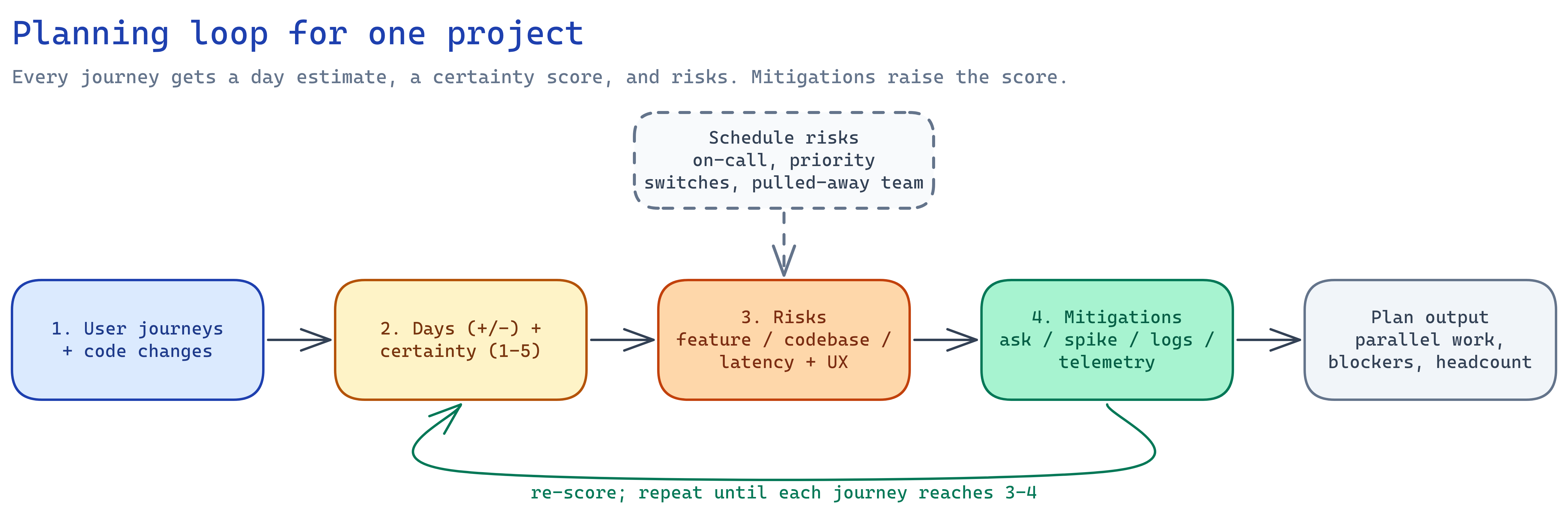
The examples below follow one illustrative journey. It is not from a real project.
1. User journeys and code changes
We broke each project into the user journeys it had to support. Then we broke each journey into the actual code changes: a migration, model changes, new controller endpoints for create, read and update, and so on. Each change became a line item someone could own.
Journey: User exports their transaction history

Code changes:
- migration: add table for exports
- model: create the export model
- controller: new endpoint for export
- content generation script
2. An estimate and a certainty score
Each journey gets an estimate in days, with a +/- range, and a certainty score from 1 to 5.
- 1: low confidence.
- 5: guaranteed to finish in that window.
The range tracks the score. Uncertain work gets a wide range. Certain work gets a narrow one.
Days beat calendar dates. When one date slips, every date after it has to be rearranged. A day count only has to be re-added.
The score is the owner’s honest read, not a target.
Estimate:  6 days +/- 4
Certainty: 2
3. Risks
Every score has to be justified with risks, in three groups:
- Feature unknowns. Parts of the build nobody has done before.
- Codebase unknowns. How the feature behaves with other services.
- Latency and UX. Problems that could surface only under real use.
A 5 usually has no risks listed. A 1 usually has many. We wrote all of them down, as exhaustively as we could.
Risks:
- Feature: unsure the generation script handles accounts with large histories
- Latency/UX: unsure how the endpoint behaves when an export takes long
4. Mitigations
Each risk gets a way to shrink it:
- Talk to someone on the team who knows the area.
- Build a prototype, or spike a smaller version of the feature.
- Talk to users, read logs, or set up telemetry.
Then I re-scored. The aim was to move every journey toward a 3 or 4 by retiring its biggest risks first.
Risk: generation script on large histories
  Mitigation: spike it against a copy of a large account

Risk: long-running export from the endpoint
  Mitigation: ask the teammate who owns background jobs

Re-scored: 6 days +/- 2, certainty 4
5. Risks outside the code
The plan also listed risks to the schedule that no engineer controls:
- On-call incidents taking time from the feature.
- A mid-project switch to another priority.
- Team members pulled onto other work, with the context-switching that follows.
Each one was written down with its expected effect on the date.
| Risk | Expected effect | What we need |
|---|---|---|
| On-call load | Up to 2 days lost in a bad week | On-call rotated off the owner during the build |
| Priority switch | Restart cost of 3 days | A heads-up before any switch, so we can re-plan |
6. Parallel work and blockers
With the journeys, estimates and dependencies on paper, the parallel work separates from the sequential work. The blockers become visible too. If the timeline looked too long, the doc showed exactly why, and exactly what more engineering resources would change. Asking for headcount became an argument from the plan, not a request.
Why document the outside risks
Decision makers shape timelines through choices like a re-prioritization or an unplanned pull onto another project. Those choices are reasonable on their own. The cost only shows up when it’s written next to the schedule.
The doc made that cost explicit before it happened. Everyone had agreed on the priorities and on what the plan needed from each of them. When something changed mid-project, we could point at the doc and discuss the trade-off with the numbers in front of us.
It also changed how resourcing worked:
- Faster staffing. Each part of the spec was clearly scoped. When a part needed more hands, I pointed at that section and people joined immediately.
- Engineers raised concerns in the doc. Risks and certainty scores gave them a place to flag problems early.
- Senior managers resourced against those concerns. Both groups worked from the same page.
The doc works as a tool for getting the resources the team needs. Management can still push back. If the estimates look too long and scope can’t shrink, a shorter range goes into the doc as a higher-risk option, with the risk written down. Used this way, the doc is a tool for the team, not a way to hold the team accountable.
Template
This is the layout of the Google Doc. Copy it per project and fill in one row per journey.
Project: <name>
Goal One sentence: what ships and who it’s for.
Launch expectations What we expect to measure and see after launch.
Journeys
Journey Code changes Estimate (days +/-) Certainty (1-5) Owner Risks and mitigations (one table per journey)
Risk Type Mitigation Certainty after Feature / codebase / latency and UX Ask, spike, read logs, add telemetry Schedule risks
Risk Expected effect What we need On-call load Priority switch Team pulled to other work Parallel work and blockers
Can run in parallel Sequential Blocked on Resourcing What changes in the date if we add engineers, and where.
Results
| Project | Outcome |
|---|---|
| Project 1 | Shipped on time, 3 weeks after the final spec |
| Project 2 | Shipped within 1.5 weeks of the final spec’d plan |
Against a baseline where no project landed within a month of its date, both landed close. Project 2 is the one I’m prouder of. Scope changed several times, the last only 3 days before the original timeline. Each change went into the doc, and the plan showed what it did to the schedule.
The takeaway
The hard part of project planning is the thinking before the build. Getting every risk, dependency and outside pressure onto one page takes effort, and that effort is what produces certainty. A team that knows the plan can hand work off, absorb a change and ask for help without losing days. That is where the speed comes from.